
While there are multiple feature rich and mature DevOps solutions available today for Salesforce partners and customers operating in the Org Development Model, DevOps for ISVs is still very much the wild west with most ISVs rolling their own solutions in isolation from each other.
In this post, I propose a North Star process and architecture for ISVs based on proven best practices from the last 9 years spent running some of the highest scale ISV release operations and creating the leading suite of open source tools for ISVs, Cumulus Suite.
This North Star is intended to be opinionated but meant to be adapted to each organization. There are a few key goals:
- Version control as the real source of truth, not a UAT org or TSO
- Compliance baked into the GitHub configuration
- Shift left to fully test features before merge instead of after
- Release testing in betas before creating a release
- Use scratch orgs for all environments (except where impossible)
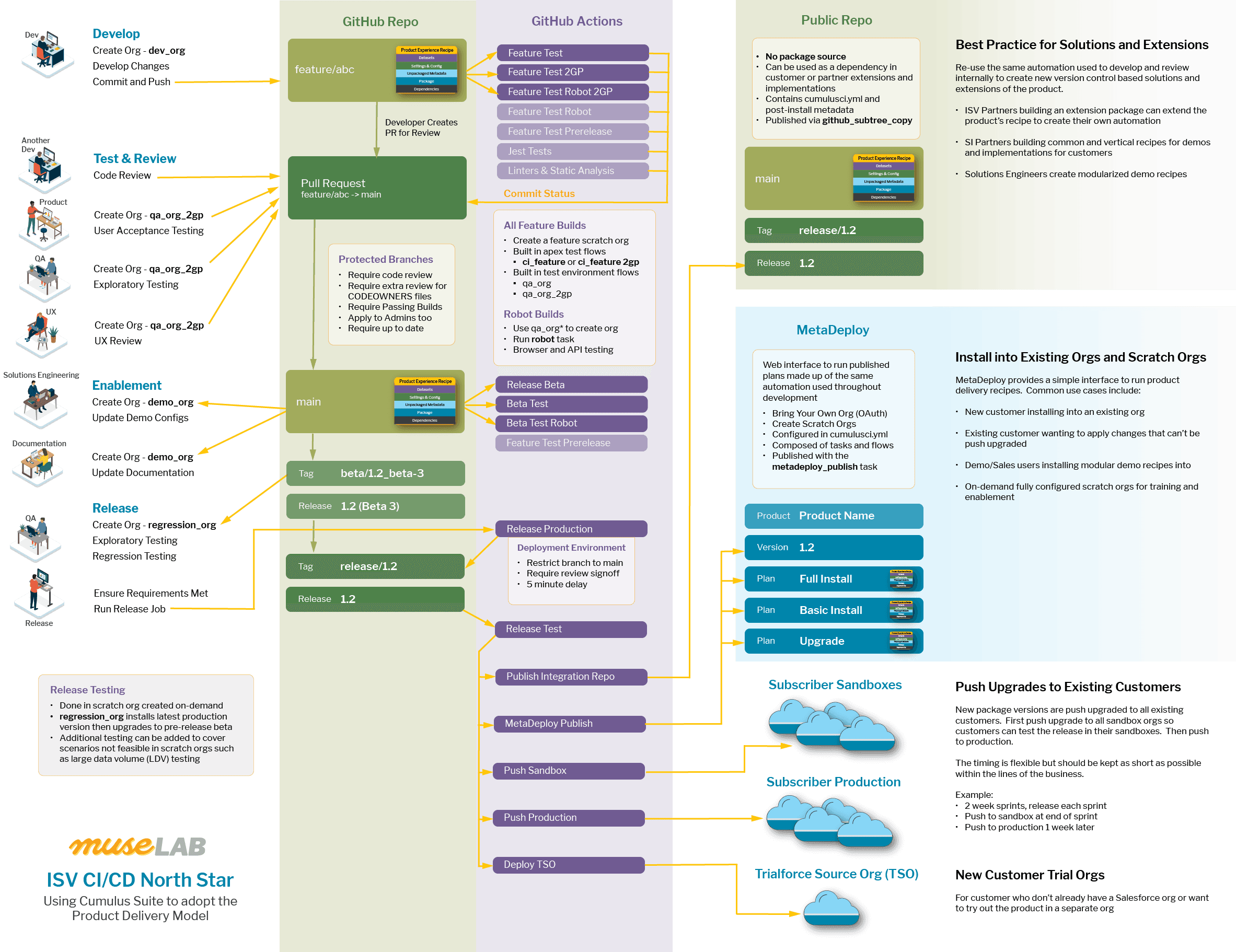
This diagram provides a high level overview of the entire Development to Delivery Experience (D2X):
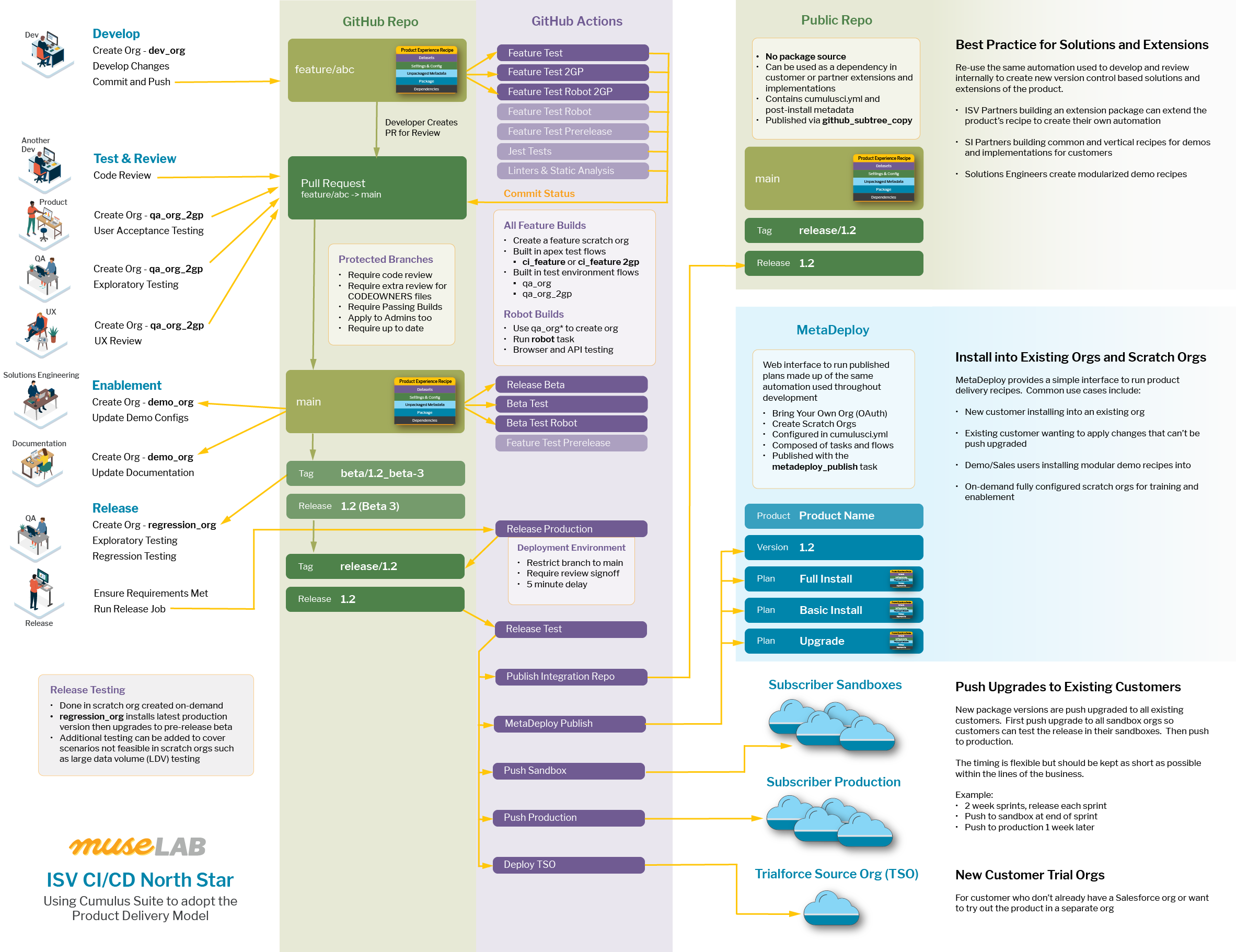
Yes, it's a bit overwhelming. It was overwhelming to even make this diagram. It's best to view the diagram as having 3 distinct phases:
- Development : The top left of the diagram represents the process for developing and reviewing changes such as new features or bug fixes
- Release : The bottom left shows the process of creating releases
- Delivery : The right shows the architecture and processes involved in delivering a release to the world (customers, partners, etc)
Development Lifecycle
Let's start with the Development Lifecycle at the top left of the diagram.
Developers perform their work in feature branches created from the main branch
in the repository. Feature branches start with feature/ and are used for all
changes to the product.
**Feature Development
** Developers use CumulusCI's dev_org flow to create fully configured
scratch orgs for their development environment for each feature branch. By
creating dedicated environments and branches for their work, their changes are
isolated from other work.
Per the [Product Delivery Model](https://cumulusci.readthedocs.io/en/stable/intro.html#the-product- delivery-model), the job of a developer is to create automation recipes to deliver complete product experiences to new and existing orgs. If a developer is creating a new feature and that new feature requires some configuration to be usable, it is their job to also automate that configuration as part of the recipe in version control. You can read more details in [A Product is More Than a Package](https://muselab.medium.com/a-product-is-more-than-a- package-861fc73f9ea7).
**GitHub Actions ** Developers commit and push their changes to their feature branch which triggers a series of builds:
- Feature Test : Creates a new scratch org and runs the
ci_featureflow to configure an org with the unmanaged package source for apex tests, then runs the apex tests - Feature Test 2GP : Creates an unverified managed package version for the commit in a separate package line from the production package and adds the package info as a commit status. Next, a scratch org is created and configured for managed apex testing with the
ci_feature_2gpflow, then runs - Feature Test Robot 2GP : Creates a fully configured 2GP QA scratch org using the
qa_org_2gpflow then runs therobottask to run the integration and browser test suite - Optional Other Builds : Individual projects can wire up any additional checks via GitHub Actions such as linters, prettier, Jest tests, etc.
Each of these builds sets its own commit status so [Protected Branches](https://docs.github.com/en/repositories/configuring-branches-and- merges-in-your-repository/defining-the-mergeability-of-pull-requests/about- protected-branches) can be configured to require passing builds before a PR is merged. This simple bit of configuration can save you from headaches around compliance audits.
**Pull Request ** When the developer is done with their work, they create a [pull request](https://docs.github.com/en/pull-requests/collaborating-with-pull- requests/proposing-changes-to-your-work-with-pull-requests/about-pull- requests) to request merging their feature branch into main. The goal of the process is to perform all testing that can possibly be performed pre-merge. You can read more details about pull request testing in The Release Subway.
Pull requests require a code review by another developer and optionally additional reviews if files listed in [CODEOWNERS](https://docs.github.com/en/repositories/managing-your- repositorys-settings-and-features/customizing-your-repository/about-code- owners) are modified.
Pull requests should also be tested by QA (or someone in the QA role) using
the 2GP feature test managed package version using the qa_org_2gp flow to
create and fully configure a new scratch org from the feature branch.
Once all checks, reviews, and testing is done, the pull request can be merged to main. Who performs the merge is team preference. I've seen teams that have QA do the merge after testing, others have the dev do it, others have a product manager. The important thing is that whoever is doing the merges validates that all required testing is done.
I also highly recommend configuring GitHub to [automatically delete branches after pull request merge](https://docs.github.com/en/repositories/configuring- branches-and-merges-in-your-repository/configuring-pull-request- merges/managing-the-automatic-deletion-of-branches).
Release Lifecycle
The release lifecycle can be thought of as two main parts: Beta Test and Release.
Beta Test The goal of the main branch is to always be ready to cut a package version. When a pull request is merged to the main branch, validate this with builds that automatically create and test a beta version:
- Release Beta : Uses
ci_master and release_beta(1GP) orrelease_2gp_beta(2GP) to upload a new managed package version of the production package and create a git tag and a GitHub release. If package version creation is successful, thegithub_automerge_maintask is run to merge the new commit on main to all feature branches. - Beta Test : Creates a new scratch org, installs the beta version, configures it for apex tests, and runs the packaged apex tests using the
ci_betaflow - Beta Test Robot : Creates a new scratch org, installs the beta version, and configures it for integration and browser testing using the
install_betaflow. Then, runs therobottask to run the automated integration and browser test suite.
When all these builds pass, we can be reasonably assured that what's in main is ready to package at any time.
Regression Testing Before creating a production release, we want to conduct full regression testing on the latest beta. The best scenario is that you've fully automated your regression testing suite, but that's pretty rare. Often regression testing involves some manual testing by a human.
The tester performing the regression testing uses the regression_org flow to
create a new scratch org configured for regression testing. This flow first
installs the latest production version of the package and then upgrades it to
the latest beta. We can do this kind of testing on the beta because we've
fully automated configuring a scratch org into a usable test environment. For
more details on this approach, see 3 Approaches to Pre-Release Testing for
Salesforce ISVs.
Release Creation
Once the regression testing has passed, the release manager (or someone
filling that role, preferrably not a dev for separation of duties) creates the
production release from the latest beta. For 1GP, they use ci_master flow to
deploy to the packaging org then the release_production flow to upload the
version and create the git tag and GitHub release. For 2GP, they use the
release_2gp_production flow to promote the latest beta version to production
and create the git tag and release.
GitHub Actions Release creation kicks off a series of builds:
- Release Test : Uses the
ci_releaseflow to create a new scratch org, install the new production version, configure for apex testing, and run packaged apex tests. This build is more a smoke test. Errors should be found here rarely or never. - Publish Integration Repo : Use the
github_copy_subtreetask to publish the project's CumulusCI automation recipes to a separate open source repository that can be used create customized recipes for implementations and extension packages. (see below) - MetaDeploy Publish : Use the
metadeploy_publishtask to publish MetaDeploy plans defined incumulusci.ymlto a MetaDeploy instance for web based installation and upgrade. (see below) - Push Sandbox : Schedule a push upgrade to all customer sandboxes. (see below)
- Push Production : Schedule a push upgrade for all customer production. (see below)
- Deploy TSO : Deploy automated configuration changes to the Trialforce Source Org (TSO) used to create new customer trial orgs.
Delivery Lifecycle
Once the released package version is ready, we move into the Delivery Lifecycle which focuses on getting the new package version into new and existing orgs.
Push Upgrades We use push upgrades to upgrade all customers to the latest version. Since sometimes there may be issues with a customer org's configuration that weren't able to be tested by the product team, we first push upgrade all customer sandbox orgs to the new version. Then, after some period of delay, we push upgrade to all production orgs.
At Salesforce.org, we ran this as a biweekly cycle. At the end of each sprint, we would create the production version and push it to sandboxes that evening. Then, a week later we would push to production.
**MetaDeploy ** For new customers wanting to install into an existing org or existing customers wanting to apply configuration for new features push upgraded into their orgs, MetaDeploy provides a simple through the web experience for running automation plans.
The metadeploy_publish task automates publishing the plans defined in
cumulusci.yml to a MetaDeploy instance. Customers then connect to their org
using OAuth2 Web Flow, optionally configure steps in the plan, then click
Install to run all of the plan's steps against their org.
**Integration Repo ** The product team's automation of the steps necessary to fully configure an environment are a valuable feature of the product. The goal of the Integration Repo is to make that automation available to implementors and ISVs building extension packages so they can use it to create their own automation recipes.
The integration repo does not contain the package source, just the CumulusCI
configuration and any post-install metadata or datasets. The
github_copy_subtree task also handles publishing the git tag and GitHub
release to the integration repo. This allows the repo to be used as a [GitHub
dependency in
CumulusCI](https://cumulusci.readthedocs.io/en/stable/dev.html#github-
repository-dependencies) and as a [source, allowing individual automation
steps to be sequenced in a new
project](https://cumulusci.readthedocs.io/en/stable/config.html#tasks-and-
flows-from-a-different-project).
Trialforce Source Org (TSO) It's common for ISVs to use a TSO as a place to persist manual admin configuration of the post-install. Since we've automated that configuration, we use that automation to update the TSO for new releases. This ensures a predictable process and compliance ready audit trail for the TSO which is often overlooked as a part of the path to production.
Conclusion
There's a lot of information in this post which can be overwhelming. Keep in mind that this is intended as a North Star, a guiding point far in the distance, rather than a map of what you should immediately set up. Getting to the complete process is a journey that can be handled iteratively. I recommend starting with the Development Lifecycle, then the Release Lifecycle, then the Delivery Lifecycle.
This North Star is intentionally opinionated, but that doesn't mean it can't be adapted to your organization or product's needs. For example, you might want to swap GitHub Actions with another CI app such as CircleCI. You might use some other integration and browser testing framework than CumulusCI's integration of Robot Framework.
If you're interested in adapting your own North Star, MuseLab's D2X Success Service offers a 6 month engagement to help guide the transformation through a combination of strategic consulting, training, and support to enable your team to fully understand and own the process. Interested in learning more? Grab some time for us to chat at https://calendly.com/muselab/let-s-talk